01 / The idea
What if the cut could bend?
A straight vertical cut removes the same column from every row. It might pass through a hiker even when there’s empty sky above and open sand below. A winding cut has more room to work.
A vertical seam is a connected path from the top of an image to the bottom, containing one pixel in every row. At the next row it can stay in the same column or move one column left or right. Remove those pixels and close each row’s gap: the picture becomes one pixel narrower.
Seam carving repeats that operation, choosing paths with low total energy, a score we’ll define in a moment. First, try it. Watch the people, the gap between them, and the mountain ridge.
Make room for both hikers.
Predict what will happen to their proportions and the space between them. Try 75% width first.
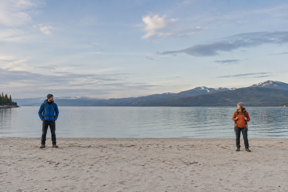
Move the width slider, or reveal the first seam before removing it.
Both people stay. The picture becomes shorter, leaving space in this fixed-height slot.
Pixel proportions stay. Content outside the narrower frame is cut away.
The complete frame fills the target width and height. Everything becomes thinner.
The surrounding slots stay fixed as the pictures narrow. Compare proportions within each group of equally sized panels. Growing the target rebuilds from the original; it does not invent deleted pixels.
A new width replaces pending work. Leaving the preview or hiding the page stops at the last completed removal; choose a width to continue. Reduced motion keeps the previous picture still until the requested result is ready.


The hikers keep much of their shape while the composition changes around them. Compare the
smaller panels: a crop, a squeeze and a proportional scale, the same choices object-fit makes for you. The carved picture is different in kind. It now shows different
spacing, and some details can bend, so a person should judge it before it goes anywhere.
These choices apply to every comparison below. The photo lab runs the TypeScript; every language is checked against the same cases.
02 / Name the rule
Look for changes in color.
How can a program recognize space it might remove? We’ll start with a modest signal: compare the colors on opposite sides of a pixel. A smooth patch of sky tends to have small differences. The edge of a jacket against that sky tends to have larger ones.
Our energy function adds six absolute differences: left versus right, then above versus
below, for each red, green, and blue channel. For grayscale neighbors with values 10 and 12
horizontally, and 20 and 25 vertically, the energy is 3 × (2 + 5) = 21. Color
values have three potentially different differences in each direction.
At an image boundary, the missing neighbor is clamped to the edge pixel, so a one-pixel image has energy zero.
export function energy(image: Raster): number[][] {
	validateImage(image);
	const { width, height, pixels } = image;
	return Array.from({ length: height }, (_, y) =>
		Array.from({ length: width }, (_, x) => {
			const left = (y * width + Math.max(0, x - 1)) * 3;
			const right = (y * width + Math.min(width - 1, x + 1)) * 3;
			const above = (Math.max(0, y - 1) * width + x) * 3;
			const below = (Math.min(height - 1, y + 1) * width + x) * 3;
			let value = 0;
			for (let channel = 0; channel < 3; channel++) {
				value += Math.abs(pixels[left + channel] - pixels[right + channel]);
				value += Math.abs(pixels[above + channel] - pixels[below + channel]);
			}
			return value;
		})
	);
}func Energy(image Raster) ([][]int, error) {
if err := validateImage(image); err != nil {
return nil, err
}
width, height, pixels := image.Width, image.Height, image.Pixels
grid := make([][]int, height)
for y := 0; y < height; y++ {
grid[y] = make([]int, width)
for x := 0; x < width; x++ {
left := (y*width + max(0, x-1)) * 3
right := (y*width + min(width-1, x+1)) * 3
above := (max(0, y-1)*width + x) * 3
below := (min(height-1, y+1)*width + x) * 3
for channel := 0; channel < 3; channel++ {
grid[y][x] += abs(pixels[left+channel] - pixels[right+channel])
grid[y][x] += abs(pixels[above+channel] - pixels[below+channel])
}
}
}
return grid, nil
}The image is an opaque RGB array in row order. Pixel (x, y) starts at (y × width + x) × 3. Each channel is an integer from 0 through 255, so this
energy is an integer from 0 through 1530.
Low energy means small local color differences. A flat-colored shirt can have low energy inside it. A busy patch of irrelevant gravel can have high energy. Our code has no idea that one belongs to a person.
Why this particular energy function?A useful proxy, and what others choose
We use absolute RGB differences so the browser and native examples agree exactly with bounded integers. It is backward energy: score the current image, then choose pixels to remove. It doesn’t look ahead at the new edges a removal will create.
The Princeton teaching specification uses a Euclidean RGB gradient and a fixed border energy of 1000. The path-finding idea works with either cost model, but the chosen seams can change.
Transparency and color management are left out. A real decoder settles those before supplying RGB values, so a transparent pixel’s hidden color never decides an edit.
03 / Follow one operation
A cheap step can lead somewhere expensive.
It’s tempting to start at the cheapest top pixel, then choose the cheapest reachable pixel in each next row. But that commits us early. A slightly more expensive start might lead to a much cheaper route further down.
Instead, ask a smaller question at every pixel: what is the cheapest total cost of reaching this pixel from the top? The first row is easy. Each pixel can start a path, so its answer is its own energy.
To reach a pixel in the second row, we must come from an allowed neighbor above it. Take the cheapest total among those neighbors and add this pixel’s energy. Once a whole row is answered, it supplies everything the next row needs.
The cheapest next pixel can be a trap.
Start with these invented energy values. A seam can move down-left, down, or down-right. Which top pixel would you choose?
| ↓ / → | 0 | 1 | 2 | 3 |
|---|---|---|---|---|
| 0 | ||||
| 1 | ||||
| 2 | ||||
| 3 |
Row 0, column 0
A path can start here. There is no earlier row, so its accumulated cost is its own energy: 1.
Change a cell and try again. Editing clears the revealed costs and marked paths. The algorithm keeps a best route to every cell so an initially expensive start remains an option.
On the starting grid, greedy pays 1 + 1 + 9 + 9 = 20. The best seam pays 4 + 4 + 1 + 1 = 10. Keeping the best route to each cell leaves that second
starting point available.
This is dynamic programming: answer overlapping smaller questions once and reuse their answers. We keep a cost for every cell; we don’t need to retain every complete route that reaches it.
04 / Read the shape
Save the cost. Remember where it came from.
For each cell, examine at most three predecessors. Store the winning total and the predecessor’s column. When we reach the last row, its smallest total tells us where an optimal seam ends. Following those saved columns upward recovers the path.
Cheapest total to this pixel
its energy + the cheapest allowed total above itFirst row: its own energy. Outside the image: no incoming path.
export function findSeam(grid: number[][]): Seam {
validateGrid(grid);
const height = grid.length,
width = grid[0].length;
const costs = grid.map((row) => [...row]);
const parents = grid.map((row) => row.map(() => -1));
for (let y = 1; y < height; y++) {
for (let x = 0; x < width; x++) {
let best = Math.max(0, x - 1);
for (let p = best + 1; p <= Math.min(width - 1, x + 1); p++) {
if (costs[y - 1][p] < costs[y - 1][best]) best = p;
}
costs[y][x] += costs[y - 1][best];
parents[y][x] = best;
}
}
let end = 0;
for (let x = 1; x < width; x++) {
if (costs[height - 1][x] < costs[height - 1][end]) end = x;
}
const total = costs[height - 1][end];
const columns = Array<number>(height);
for (let y = height - 1; y >= 0; y--) {
columns[y] = end;
end = parents[y][end];
}
return { columns, total, costs, parents };
}func FindSeam(grid [][]int) (Seam, error) {
if err := validateGrid(grid); err != nil {
return Seam{}, err
}
height, width := len(grid), len(grid[0])
costs, parents := make([][]int, height), make([][]int, height)
for y, row := range grid {
costs[y] = append([]int(nil), row...)
parents[y] = make([]int, width)
for x := range parents[y] {
parents[y][x] = -1
}
}
for y := 1; y < height; y++ {
for x := 0; x < width; x++ {
best := max(0, x-1)
for p := best + 1; p <= min(width-1, x+1); p++ {
if costs[y-1][p] < costs[y-1][best] {
best = p
}
}
costs[y][x] += costs[y-1][best]
parents[y][x] = best
}
}
end := 0
for x := 1; x < width; x++ {
if costs[height-1][x] < costs[height-1][end] {
end = x
}
}
total := costs[height-1][end]
columns := make([]int, height)
for y := height - 1; y >= 0; y-- {
columns[y] = end
end = parents[y][end]
}
return Seam{columns, total, costs, parents}, nil
}The fact we preserve after finishing a row is precise: every cost in that row is the cheapest total of a legal path from the top to that cell. Every incoming path must pass through one of the allowed predecessors, whose best totals are already known. Taking their minimum covers every possible way in.
Rows advance downward until there are none left. Equal totals choose the smaller predecessor column; equal endpoints choose the smaller final column. That makes every implementation return the same optimal seam, though another tied seam would be just as cheap.
Where is the graph?The pixel grid already supplies the edges
Treat each pixel as a vertex and each allowed downward step as a directed edge. The path pays for the vertices it visits. It can never return to an earlier row, so this graph has no directed cycle. Row order already puts each predecessor before the cells that need it.
We can solve this shortest-path problem directly in the arrays. A heap or explicit graph object would add machinery without changing which neighbors are possible. The Princeton specification describes the same graph connection.
Close one gap in each row.
The seam gives us one column per row. Copy every other pixel in its original order. The output has the same height and one less column.
export function removeSeam(image: Raster, columns: number[]): Raster {
validateImage(image);
const { width, height, pixels } = image;
if (width <= 1 || columns.length !== height)
throw new Error('Removal needs width > 1 and one column per row.');
for (let y = 0; y < height; y++) {
const x = columns[y];
if (
!Number.isInteger(x) ||
x < 0 ||
x >= width ||
(y > 0 && Math.abs(x - columns[y - 1]) > 1)
) {
throw new Error('Seam columns must be in bounds and connected.');
}
}
const result: number[] = [];
for (let y = 0; y < height; y++) {
for (let x = 0; x < width; x++) {
if (x === columns[y]) continue;
const offset = (y * width + x) * 3;
result.push(pixels[offset], pixels[offset + 1], pixels[offset + 2]);
}
}
return { width: width - 1, height, pixels: result };
}func RemoveSeam(image Raster, columns []int) (Raster, error) {
if err := validateImage(image); err != nil {
return Raster{}, err
}
width, height, pixels := image.Width, image.Height, image.Pixels
if width <= 1 || len(columns) != height {
return Raster{}, fmt.Errorf("removal needs width > 1 and one column per row")
}
for y, x := range columns {
if x < 0 || x >= width || (y > 0 && abs(x-columns[y-1]) > 1) {
return Raster{}, fmt.Errorf("seam columns must be in bounds and connected")
}
}
result := make([]int, 0, (width-1)*height*3)
for y := 0; y < height; y++ {
for x := 0; x < width; x++ {
if x == columns[y] {
continue
}
offset := (y*width + x) * 3
result = append(result, pixels[offset:offset+3]...)
}
}
return Raster{width - 1, height, result}, nil
}To reach a target width, repeat on the new image. Removing a pixel makes formerly separated pixels neighbors. That can change their energy, so our next search starts with a freshly calculated map.
export function carve(image: Raster, targetWidth: number): Raster {
validateImage(image);
if (!Number.isInteger(targetWidth) || targetWidth < 1 || targetWidth > image.width) {
throw new Error('Target width must be between 1 and the original width.');
}
let preview: Raster = { ...image, pixels: [...image.pixels] };
while (preview.width > targetWidth) {
const seam = findSeam(energy(preview));
preview = removeSeam(preview, seam.columns);
}
return preview;
}func Carve(image Raster, targetWidth int) (Raster, error) {
if err := validateImage(image); err != nil {
return Raster{}, err
}
if targetWidth < 1 || targetWidth > image.Width {
return Raster{}, fmt.Errorf("target width must be between 1 and the original width")
}
preview := Raster{image.Width, image.Height, append([]int(nil), image.Pixels...)}
for preview.Width > targetWidth {
grid, err := Energy(preview)
if err != nil {
return Raster{}, err
}
seam, err := FindSeam(grid)
if err != nil {
return Raster{}, err
}
preview, err = RemoveSeam(preview, seam.Columns)
if err != nil {
return Raster{}, err
}
}
return preview, nil
}The editor keeps the original and the width it wants; carve hands back a new preview
each time. The caller below uses a tiny decoded image so the complete files run without an image
library. The photo lab decodes its PNG into the same RGB arrays.
export function runExample(): void {
// A tiny decoded image: each number becomes a grayscale RGB pixel.
const values = [10, 10, 200, 10, 10, 200, 10, 10, 200];
const original: Raster = { width: 3, height: 3, pixels: values.flatMap((v) => [v, v, v]) };
const first = findSeam(energy(original));
const preview = carve(original, 2);
console.log(`seam: ${first.columns.join(',')}; energy: ${first.total}`);
console.log(
`preview: ${preview.width}x${preview.height}; original: ${original.width}x${original.height}`
);
// The editor displays the preview; the original remains available for another size.
}func runExample() error {
values := []int{10, 10, 200, 10, 10, 200, 10, 10, 200}
original := Raster{Width: 3, Height: 3}
for _, value := range values {
original.Pixels = append(original.Pixels, value, value, value)
}
grid, err := Energy(original)
if err != nil {
return err
}
first, err := FindSeam(grid)
if err != nil {
return err
}
preview, err := Carve(original, 2)
if err != nil {
return err
}
columns := make([]string, len(first.Columns))
for y, x := range first.Columns {
columns[y] = fmt.Sprint(x)
}
fmt.Printf("seam: %s; energy: %d\n", strings.Join(columns, ","), first.Total)
fmt.Printf("preview: %dx%d; original: %dx%d\n", preview.Width, preview.Height, original.Width, original.Height)
return nil
}Each version prints seam: 0,0,0; energy: 0, followed by preview: 2x3; original: 3x3. The first column’s neighbors share its gray value;
deleting it leaves the contrasting stripe. The original remains available for another
preview.
Complete runnable filesAll types, validation, helpers and an invocation
Copy a complete file into a standalone directory. No third-party libraries are needed. It works on RGB values; decoding, display and encoding belong to the application.
TypeScript: compile with tsc carve.ts --target ES2022 --module commonjs --outDir out, then run node out/carve.js in a directory without an ES-module package setting. Go 1.22+: go run carve.go.
// Opaque RGB pixels in row order. No image decoder or encoder is required.
export type Raster = { width: number; height: number; pixels: number[] };
export type Seam = { columns: number[]; total: number; costs: number[][]; parents: number[][] };
const MAX_SIDE = 512;
function dimension(value: number): boolean {
return Number.isInteger(value) && value >= 1 && value <= MAX_SIDE;
}
function validateImage(image: Raster): void {
if (
!dimension(image.width) ||
!dimension(image.height) ||
image.pixels.length !== image.width * image.height * 3
) {
throw new Error('Expected a nonempty RGB image, at most 512 × 512.');
}
for (const channel of image.pixels) {
if (!Number.isInteger(channel) || channel < 0 || channel > 255)
throw new Error('RGB channels must be integers from 0 to 255.');
}
}
function validateGrid(grid: number[][]): void {
if (!dimension(grid.length) || !dimension(grid[0]?.length))
throw new Error('Expected a nonempty energy grid, at most 512 × 512.');
for (const row of grid) {
if (row.length !== grid[0].length) throw new Error('Energy rows must have equal width.');
for (const value of row) {
if (!Number.isInteger(value) || value < 0 || value > 1_000_000)
throw new Error('Energy must be an integer from 0 to 1,000,000.');
}
}
}
export function energy(image: Raster): number[][] {
validateImage(image);
const { width, height, pixels } = image;
return Array.from({ length: height }, (_, y) =>
Array.from({ length: width }, (_, x) => {
const left = (y * width + Math.max(0, x - 1)) * 3;
const right = (y * width + Math.min(width - 1, x + 1)) * 3;
const above = (Math.max(0, y - 1) * width + x) * 3;
const below = (Math.min(height - 1, y + 1) * width + x) * 3;
let value = 0;
for (let channel = 0; channel < 3; channel++) {
value += Math.abs(pixels[left + channel] - pixels[right + channel]);
value += Math.abs(pixels[above + channel] - pixels[below + channel]);
}
return value;
})
);
}
export function findSeam(grid: number[][]): Seam {
validateGrid(grid);
const height = grid.length,
width = grid[0].length;
const costs = grid.map((row) => [...row]);
const parents = grid.map((row) => row.map(() => -1));
for (let y = 1; y < height; y++) {
for (let x = 0; x < width; x++) {
let best = Math.max(0, x - 1);
for (let p = best + 1; p <= Math.min(width - 1, x + 1); p++) {
if (costs[y - 1][p] < costs[y - 1][best]) best = p;
}
costs[y][x] += costs[y - 1][best];
parents[y][x] = best;
}
}
let end = 0;
for (let x = 1; x < width; x++) {
if (costs[height - 1][x] < costs[height - 1][end]) end = x;
}
const total = costs[height - 1][end];
const columns = Array<number>(height);
for (let y = height - 1; y >= 0; y--) {
columns[y] = end;
end = parents[y][end];
}
return { columns, total, costs, parents };
}
export function removeSeam(image: Raster, columns: number[]): Raster {
validateImage(image);
const { width, height, pixels } = image;
if (width <= 1 || columns.length !== height)
throw new Error('Removal needs width > 1 and one column per row.');
for (let y = 0; y < height; y++) {
const x = columns[y];
if (
!Number.isInteger(x) ||
x < 0 ||
x >= width ||
(y > 0 && Math.abs(x - columns[y - 1]) > 1)
) {
throw new Error('Seam columns must be in bounds and connected.');
}
}
const result: number[] = [];
for (let y = 0; y < height; y++) {
for (let x = 0; x < width; x++) {
if (x === columns[y]) continue;
const offset = (y * width + x) * 3;
result.push(pixels[offset], pixels[offset + 1], pixels[offset + 2]);
}
}
return { width: width - 1, height, pixels: result };
}
export function carve(image: Raster, targetWidth: number): Raster {
validateImage(image);
if (!Number.isInteger(targetWidth) || targetWidth < 1 || targetWidth > image.width) {
throw new Error('Target width must be between 1 and the original width.');
}
let preview: Raster = { ...image, pixels: [...image.pixels] };
while (preview.width > targetWidth) {
const seam = findSeam(energy(preview));
preview = removeSeam(preview, seam.columns);
}
return preview;
}
export function runExample(): void {
// A tiny decoded image: each number becomes a grayscale RGB pixel.
const values = [10, 10, 200, 10, 10, 200, 10, 10, 200];
const original: Raster = { width: 3, height: 3, pixels: values.flatMap((v) => [v, v, v]) };
const first = findSeam(energy(original));
const preview = carve(original, 2);
console.log(`seam: ${first.columns.join(',')}; energy: ${first.total}`);
console.log(
`preview: ${preview.width}x${preview.height}; original: ${original.width}x${original.height}`
);
// The editor displays the preview; the original remains available for another size.
}
runExample();
package main
import (
"fmt"
"strings"
)
type Raster struct {
Width, Height int
Pixels []int
}
type Seam struct {
Columns []int
Total int
Costs, Parents [][]int
}
func dimension(value int) bool { return value >= 1 && value <= 512 }
func validateImage(image Raster) error {
if !dimension(image.Width) || !dimension(image.Height) || len(image.Pixels) != image.Width*image.Height*3 {
return fmt.Errorf("expected a nonempty RGB image, at most 512 x 512")
}
for _, channel := range image.Pixels {
if channel < 0 || channel > 255 {
return fmt.Errorf("RGB channels must be integers from 0 to 255")
}
}
return nil
}
func validateGrid(grid [][]int) error {
if !dimension(len(grid)) || !dimension(len(grid[0])) {
return fmt.Errorf("expected a nonempty energy grid, at most 512 x 512")
}
for _, row := range grid {
if len(row) != len(grid[0]) {
return fmt.Errorf("energy rows must have equal width")
}
for _, value := range row {
if value < 0 || value > 1000000 {
return fmt.Errorf("energy must be from 0 to 1,000,000")
}
}
}
return nil
}
func abs(value int) int {
if value < 0 {
return -value
}
return value
}
func Energy(image Raster) ([][]int, error) {
	if err := validateImage(image); err != nil {
		return nil, err
	}
	width, height, pixels := image.Width, image.Height, image.Pixels
	grid := make([][]int, height)
	for y := 0; y < height; y++ {
		grid[y] = make([]int, width)
		for x := 0; x < width; x++ {
			left := (y*width + max(0, x-1)) * 3
			right := (y*width + min(width-1, x+1)) * 3
			above := (max(0, y-1)*width + x) * 3
			below := (min(height-1, y+1)*width + x) * 3
			for channel := 0; channel < 3; channel++ {
				grid[y][x] += abs(pixels[left+channel] - pixels[right+channel])
				grid[y][x] += abs(pixels[above+channel] - pixels[below+channel])
			}
		}
	}
	return grid, nil
}
func FindSeam(grid [][]int) (Seam, error) {
	if err := validateGrid(grid); err != nil {
		return Seam{}, err
	}
	height, width := len(grid), len(grid[0])
	costs, parents := make([][]int, height), make([][]int, height)
	for y, row := range grid {
		costs[y] = append([]int(nil), row...)
		parents[y] = make([]int, width)
		for x := range parents[y] {
			parents[y][x] = -1
		}
	}
	for y := 1; y < height; y++ {
		for x := 0; x < width; x++ {
			best := max(0, x-1)
			for p := best + 1; p <= min(width-1, x+1); p++ {
				if costs[y-1][p] < costs[y-1][best] {
					best = p
				}
			}
			costs[y][x] += costs[y-1][best]
			parents[y][x] = best
		}
	}
	end := 0
	for x := 1; x < width; x++ {
		if costs[height-1][x] < costs[height-1][end] {
			end = x
		}
	}
	total := costs[height-1][end]
	columns := make([]int, height)
	for y := height - 1; y >= 0; y-- {
		columns[y] = end
		end = parents[y][end]
	}
	return Seam{columns, total, costs, parents}, nil
}
func RemoveSeam(image Raster, columns []int) (Raster, error) {
	if err := validateImage(image); err != nil {
		return Raster{}, err
	}
	width, height, pixels := image.Width, image.Height, image.Pixels
	if width <= 1 || len(columns) != height {
		return Raster{}, fmt.Errorf("removal needs width > 1 and one column per row")
	}
	for y, x := range columns {
		if x < 0 || x >= width || (y > 0 && abs(x-columns[y-1]) > 1) {
			return Raster{}, fmt.Errorf("seam columns must be in bounds and connected")
		}
	}
	result := make([]int, 0, (width-1)*height*3)
	for y := 0; y < height; y++ {
		for x := 0; x < width; x++ {
			if x == columns[y] {
				continue
			}
			offset := (y*width + x) * 3
			result = append(result, pixels[offset:offset+3]...)
		}
	}
	return Raster{width - 1, height, result}, nil
}
func Carve(image Raster, targetWidth int) (Raster, error) {
	if err := validateImage(image); err != nil {
		return Raster{}, err
	}
	if targetWidth < 1 || targetWidth > image.Width {
		return Raster{}, fmt.Errorf("target width must be between 1 and the original width")
	}
	preview := Raster{image.Width, image.Height, append([]int(nil), image.Pixels...)}
	for preview.Width > targetWidth {
		grid, err := Energy(preview)
		if err != nil {
			return Raster{}, err
		}
		seam, err := FindSeam(grid)
		if err != nil {
			return Raster{}, err
		}
		preview, err = RemoveSeam(preview, seam.Columns)
		if err != nil {
			return Raster{}, err
		}
	}
	return preview, nil
}
func runExample() error {
	values := []int{10, 10, 200, 10, 10, 200, 10, 10, 200}
	original := Raster{Width: 3, Height: 3}
	for _, value := range values {
		original.Pixels = append(original.Pixels, value, value, value)
	}
	grid, err := Energy(original)
	if err != nil {
		return err
	}
	first, err := FindSeam(grid)
	if err != nil {
		return err
	}
	preview, err := Carve(original, 2)
	if err != nil {
		return err
	}
	columns := make([]string, len(first.Columns))
	for y, x := range first.Columns {
		columns[y] = fmt.Sprint(x)
	}
	fmt.Printf("seam: %s; energy: %d\n", strings.Join(columns, ","), first.Total)
	fmt.Printf("preview: %dx%d; original: %dx%d\n", preview.Width, preview.Height, original.Width, original.Height)
	return nil
}
func main() {
if err := runExample(); err != nil {
panic(err)
}
}
Reading the TypeScriptPlain arrays, row copies, and exceptions
The image is a plain number[] and the grids are arrays of rows. A number could hold a fraction, so validation checks that every channel, energy,
and dimension is a whole number in range before any table is allocated.
findSeam copies each row with a spread, so accumulated costs never
overwrite the energy grid it was given, and carve copies the pixels before
its first removal. Every refusal is a thrown Error.
Reading the GoFresh slices, min and max, and returned errors
FindSeam copies each row with append([]int(nil), row...). A
shallow copy of the outer slice alone would still share its rows. The built-in min and max (Go 1.21 and later) keep predecessor columns inside
the image.
Each function returns an error beside its result, and Carve stops at the first one.
What is refusedSizes, channels, energies, and seams
An image must be 1 to 512 pixels on each side, with three channels per pixel, each a whole number from 0 through 255. The seam finder accepts whole-number energies from 0 through 1,000,000 in grids of at most 512 × 512, with rows of equal width. A complete path therefore totals at most 512,000,000: exact in TypeScript numbers and within a signed 32-bit integer.
Removal validates the whole seam before copying: one column per row, in bounds, each
step at most one column, and an image at least two pixels wide. carve returns
an independent copy when asked for the original width, and treats a wider target or width
zero as an error.
05 / Try a decision
Even the next cut is a new question.
Go back to the photo, reveal a seam, and remove it. Its pixels are gone; neighboring columns shift into the gap. A saved column number is meaningful only for the image it was calculated on.
The stronger limit is what we asked the algorithm to optimize. It finds a minimum-energy seam for the current grid. Repeating that choice doesn’t promise the least visible distortion for the picture as a whole.
Push the photo to one-third width and compare the mountain ridge. The algorithm can keep both people while rearranging the landscape. For a diagram, a building elevation or a photograph used as evidence, changing that geometry may defeat the purpose of the image.
The technique’s own authors went after this. A 2008 follow-up by Rubinstein, Shamir and Avidan scores a seam by the energy its removal would add, called forward energy, which avoids some of the new edges you see along that ridge.
06 / Follow the cost
Every seam pays for the whole picture again.
| Operation | Time | Extra space | What it assumes |
|---|---|---|---|
| Score every pixel | O(WH) | O(WH) | Six channel differences per pixel, written into a new W × H energy grid. |
| Find the cheapest seam | O(WH) | O(WH) | At most three predecessors per cell. The cost and parent tables are two more W × H grids. |
| Recover the seam | O(H) | O(H) | Follow the saved parent columns from the bottom row to the top. |
| Remove one seam | O(WH) | O(WH) | Copy every other pixel into a new image one column narrower. |
| Carve k columns | O(kWH) | O(WH) | All four steps again at widths W down to W − k + 1. One round’s tables are enough at a time. |
One seam costs O(WH): scoring, searching, and copying each touch every pixel once, and recovering the path takes H steps. The tables are what let it recover the path. Keeping only the previous row of costs would still give the total, but the columns to remove need the W × H parent table.
Removing k columns visits widths W, W − 1, through W − k + 1. Recomputing and copying gives
work proportional to H × [kW − k(k − 1)/2], or O(kWH) as a simple upper bound.
Halving a 512-pixel-wide photo repeats the whole search 256 times.
That is why an editor previews a smaller copy. Downsampling changes the energy map, though, so look at the result at full size before approving it.
07 / Give it a real job
Let the editor own the original.
Picture the travel site’s content editor. An author uploads a wide photo for a story, and the story grid shows square cards. The editor offers a crop, a fit, and “make room”, with a slider for how much to narrow. As the author drags, the preview follows.
Never edited
The uploaded photo, kept for every future layout.
Changes while dragging
Only the newest slider position matters.
Replaced when work finishes
Shown with its size until someone approves it.
Approval is the moment a preview becomes an asset: encode it, store it beside the original, and let the grid use it. The next layout change starts from the original again, never from a carved copy.
This is work that belongs in the browser. The author wants the picture to follow their thumb, and a server round trip for every slider step would trail behind. It is also real work: every seam recomputes energy for the whole preview, which is why the next part is about keeping the page responsive while it runs.
Build UIs?CSS already crops, scales and squeezes your images. The fourth option is yours to run, and it belongs in a worker.
Where it already is in your components
Not in React, Svelte or the browser: none of them takes pixels out of a photograph for
you. It is in the image tools you may already use. Photoshop has shipped it since CS4 as Content-Aware Scale, GIMP has the Liquid Rescale plug-in, and ImageMagick’s -liquid-rescale will “rescale image with seam-carving” from the command line.
In your components you reach for the other panels from the photo lab instead. On an <img> in a fixed slot, object-fit: cover crops, and object-position chooses which part survives. contain scales the whole picture down and leaves bars. fill, the initial value, stretches it to the box. In MDN’s words,
the image is “clipped to fit” or “stretched to fit.”
<picture> goes a step further with art direction: a different file, cropped by a person, for a narrower layout. And next/image resizes. Its documentation covers device sizes, modern formats, layout stability and lazy loading; in the pinned Next.js 16.0.0 optimizer, optimizeImage asks Sharp to resize and re-encode. Each of these changes the
frame or the file. None changes what is inside the picture.
So a carved image reaches your components the ordinary way: prepared and approved in the
editor, then delivered by the same <img>, <picture> or next/image you already use.
When you have to own it
Now build that slider. Call carve from its input handler and the page locks
up: JavaScript runs each task to completion before it handles the next event, so the
slider stops following the pointer until the last seam is gone. Move the work into a Web
Worker. Workers have OffscreenCanvas too, with the same getImageData and putImageData, if you want
the worker to draw as well.
Pixels don’t cross threads for free. ImageData isn’t on the list of transferable objects, but its ArrayBuffer is. Transferring moves the memory instead of copying
it, and leaves your side detached with a byteLength of 0. So the page keeps the
original and transfers a copy for each request.
The drag also outruns the worker. A worker has its own event loop, and while one message
handler is busy removing dozens of seams, the message saying the slider moved waits. The
snippet removes one seam, then yields, so a newer request can arrive; the older loop
sees it is no longer the latest and stops. Results carry their revision, and the page
draws only the latest. The blunt alternative is worker.terminate(), which stops a worker at once without letting it finish, followed by a fresh worker.
import { energy, findSeam, removeSeam, type Raster } from '../carve';

export type PreviewRequest = {
	revision: number;
	width: number;
	height: number;
	rgba: ArrayBuffer;
	target: number;
};
export type PreviewResult = { revision: number; width: number; height: number; rgba: ArrayBuffer };

// Canvas pixels are RGBA. The lesson's carve functions work on opaque RGB.
export function toRaster(rgba: Uint8ClampedArray, width: number, height: number): Raster {
	const pixels: number[] = [];
	for (let i = 0; i < rgba.length; i += 4) pixels.push(rgba[i], rgba[i + 1], rgba[i + 2]);
	return { width, height, pixels };
}

export function toRGBA(image: Raster): Uint8ClampedArray<ArrayBuffer> {
	const rgba = new Uint8ClampedArray(image.width * image.height * 4);
	for (let p = 0; p < image.width * image.height; p++) {
		rgba.set(image.pixels.slice(p * 3, p * 3 + 3), p * 4);
		rgba[p * 4 + 3] = 255;
	}
	return rgba;
}

// The same rule as the lesson's carve: a whole number of columns, at least 1, at most the width.
export function validTarget(target: number, width: number) {
	return Number.isInteger(target) && target >= 1 && target <= width;
}

// One seam at a time. Between seams, hand control back to the event loop so a newer
// request can be delivered, then stop if this one is no longer the latest.
export async function carveUntil(
	image: Raster,
	target: number,
	isLatest: () => boolean,
	yieldToEvents: () => Promise<void>
): Promise<Raster | null> {
	if (!validTarget(target, image.width))
		throw new RangeError('Target width must be between 1 and the original width.');
	let preview = image;
	while (preview.width > target) {
		if (!isLatest()) return null;
		preview = removeSeam(preview, findSeam(energy(preview)).columns);
		await yieldToEvents();
	}
	return isLatest() ? preview : null;
}

type WorkerScope = {
	onmessage: ((event: MessageEvent<PreviewRequest>) => void) | null;
	postMessage(message: PreviewResult, transfer: Transferable[]): void;
};

// In preview.worker.ts: servePreviews(self as unknown as WorkerScope)
export function servePreviews(
	scope: WorkerScope,
	yieldToEvents = () => new Promise<void>((done) => setTimeout(done, 0))
) {
	let latest = 0;
	scope.onmessage = async ({ data }) => {
		latest = data.revision;
		// Refuse an unreachable target here: a throw inside this async handler would be an
		// unhandled rejection. The page keeps showing its last preview.
		if (!validTarget(data.target, data.width)) return;
		const original = toRaster(new Uint8ClampedArray(data.rgba), data.width, data.height);
		const isLatest = () => data.revision === latest;
		const preview = await carveUntil(original, data.target, isLatest, yieldToEvents);
		if (!preview) return; // a newer slider position took over
		const rgba = toRGBA(preview);
		const { revision, height } = data;
		const result = { revision, width: preview.width, height, rgba: rgba.buffer };
		scope.postMessage(result, [rgba.buffer]); // moved, not copied
	};
}

// On the page: keep the original pixels, send a copy for every slider position.
export function connectPreview(
	worker: Pick<Worker, 'postMessage'> & {
		onmessage: ((event: { data: PreviewResult }) => void) | null;
	},
	original: { width: number; height: number; data: Uint8ClampedArray },
	draw: (result: PreviewResult) => void // e.g. ctx.putImageData(new ImageData(…), 0, 0)
) {
	let revision = 0;
	worker.onmessage = ({ data }) => {
		if (data.revision === revision) draw(data); // ignore results for older positions
	};
	return function requestPreview(target: number) {
		// Transferring detaches a buffer, so never transfer the original's.
		const copy = original.data.slice();
		const { width, height } = original;
		const request = { revision: ++revision, width, height, rgba: copy.buffer, target };
		worker.postMessage(request, [copy.buffer]);
	};
}
Nothing here belongs to React or Svelte. Both call requestPreview from the slider’s
input handler and draw in the callback. The rule you are working around comes from the event
loop, so it is the same in either.
08 / Make the call
An editing option you preview.
Seam carving is worth offering when a composition needs a different aspect ratio, there is removable space around the subjects, and someone can judge the result. Put it beside a crop and a replacement photo, and keep the original until the author accepts a derivative.
For routine responsive delivery, proportional scaling and an intentional crop are good defaults. Prefer them when geometry must stay faithful, text must stay readable, or the photograph is crowded with detail. A focal point or a separate mobile composition often solves the layout need more directly.
SourcesThe original work, tools, and platform references
Avidan and Shamir’s Seam Carving for Content-Aware Image Resizing (2007) introduced the technique. The Princeton specification explains the pixel-path formulation and boundary cases. Our code is written independently, removes vertical seams only, and uses the integer energy defined above.
Photoshop’s Content-Aware Scaling came from a MERL license, as the seam carving article records, along with forward energy. The Liquid Rescale library behind GIMP’s plug-in implements the Avidan–Shamir paper.
Platform behavior comes from MDN: object-fit, responsive images, OffscreenCanvas, transferable objects, Worker.terminate() and the execution model.
The two hikers are an AI-generated teaching photograph; every carved result comes from the code. References were checked on 13 September 2026, and the Next.js observation is pinned to version 16.0.0.
09 / Take the idea with you
Explain a narrower photo without saying “seam carving.”
“Give every pixel a score for how different it is from its neighbors. Find the path from top to bottom, one pixel per row and never jumping more than one column, whose scores add up to the least, by keeping the cheapest way to reach every pixel row by row. Take that path out, close the gap, and score the picture again.”
Then say what it never understood: which pixels were people. Before moving on, open a
component with object-fit in it and ask which of the four answers that slot really
wants.
Connections to follow nextRelated lessons
- Dynamic programming is the move that finds the seam: answer each smaller question once and reuse it.
- Levenshtein distance fills a table the same way and walks it back to recover a sequence of choices; there they are text edits, here pixels to remove.
- Dijkstra’s shortest path solves the general shortest-path problem; a seam is the special case where every step goes down a row, so no heap is needed.
- Floyd–Steinberg dithering also reads a picture pixel by pixel and has to decide where that work runs.